Blog

  • 2010 Arizona Citizens Clean Election Commission .PDF Downloads

    Arizona Voters: A .pdf (70MB) version of the giant tree-wasting booklet published by the Citizens Clean Election Commission that you may have received in the mail–the one with little blurbs/statements on all the candidates–can be found here. Other currently relevant publications from the AZ CCDC can be found here.

    General elections are just around the corner, so please forward this information to your Arizonan friends and encourage them to spend the 5 minutes to register to vote via the Service Arizona website.

  • South Korea Travel Tips For United States Travelers

    Interesting tidbits on Seoul for United States travelers:

    • The food is generally awesome, though the beef sucks and is more expensive. If you decide to try American-style fast food, expect variations customized to the locale. (For example, the McDonalds I tried had “Bulgogi Burgers” as the #1 combo item. Interesting to try, but still McDonalds.) If you eat a lot of wheats and grains, expect to switch over to many more rice-based foods such as rice noodles, pastries, and plain old rice. Seriously … that’s just the culture and you’d be wise to just deal with it.
    • With a few excepts–most notably watermelon–fruits are generally not served often. Many native and healthy vegetables are frequently served cold with most meals, generally covered with regional spices. The kimchi (김치) is generally excellent, as you’d probably suspect. If you haven’t ever had it… well, you’ll have plenty. 🙂 It’s a huge cultural staple in Korea.
    • If you look white, people will generally do their best to speak English to you, if they can. If you look Korean, they’ll almost always speak Korean. The general rule of thumb is that the more a type of job makes, the more likely it is that the person will speak English. In other words, don’t expect English skills from store clerks and restaurant staff. For those people looking Japanese or Chinese I couldn’t discern any obvious prejudacies, though I’m very “white” looking and don’t speak the language so I could easily be missing obvious cues.
    • The subway system in Seoul is huge (as is Seoul itself with over 10 million people), and is akin to the systems in San Francisco, Chicago and New York. Most subway signs and ticketing machines have English, though announcements in Korean can be a little difficult to discern for native English speakers. I would advise at least learning the basics of the Korean alphabet (Hangul) and pronunciation rules so you at least sound out words only written in Korean, albeit extremely slowly and with a horrible accent.
    • WiFi connectivity in disappointingly similar to U.S. cities. That is, in urban areas it’s generally within range but paid hourly/daily (such as in hotels, Starbucks, coffee houses etc.), or if you’re lucky you’ll infrequently find a decent free open access point. It’s pretty much non-existent in rural areas.
    • Most sink faucet handle operate the reverse of U.S. handles to operate water flow. (In the U.S. you pull up or “lift” the handle to turn on the water, here you push down.)
    • Almost all places seem to have toilets available (as opposed to just squating over some sort of hole), so I wouldn’t worry about that. All respectable establishments seem to have toilets. Some have bidets.
    • For various cultural reasons, Koreans tend to be very clean, especially when it comes to floors. Remember to take your shoes off before entering peoples homes. Some restaurants will require you to do the same, particularly those here you sit on the floor, which makes sense.
  • The $1K CD/DVD/LightScribe Replicator: The DIY Guide To Manufacturing Your Own Discs For Less Than $1 Each

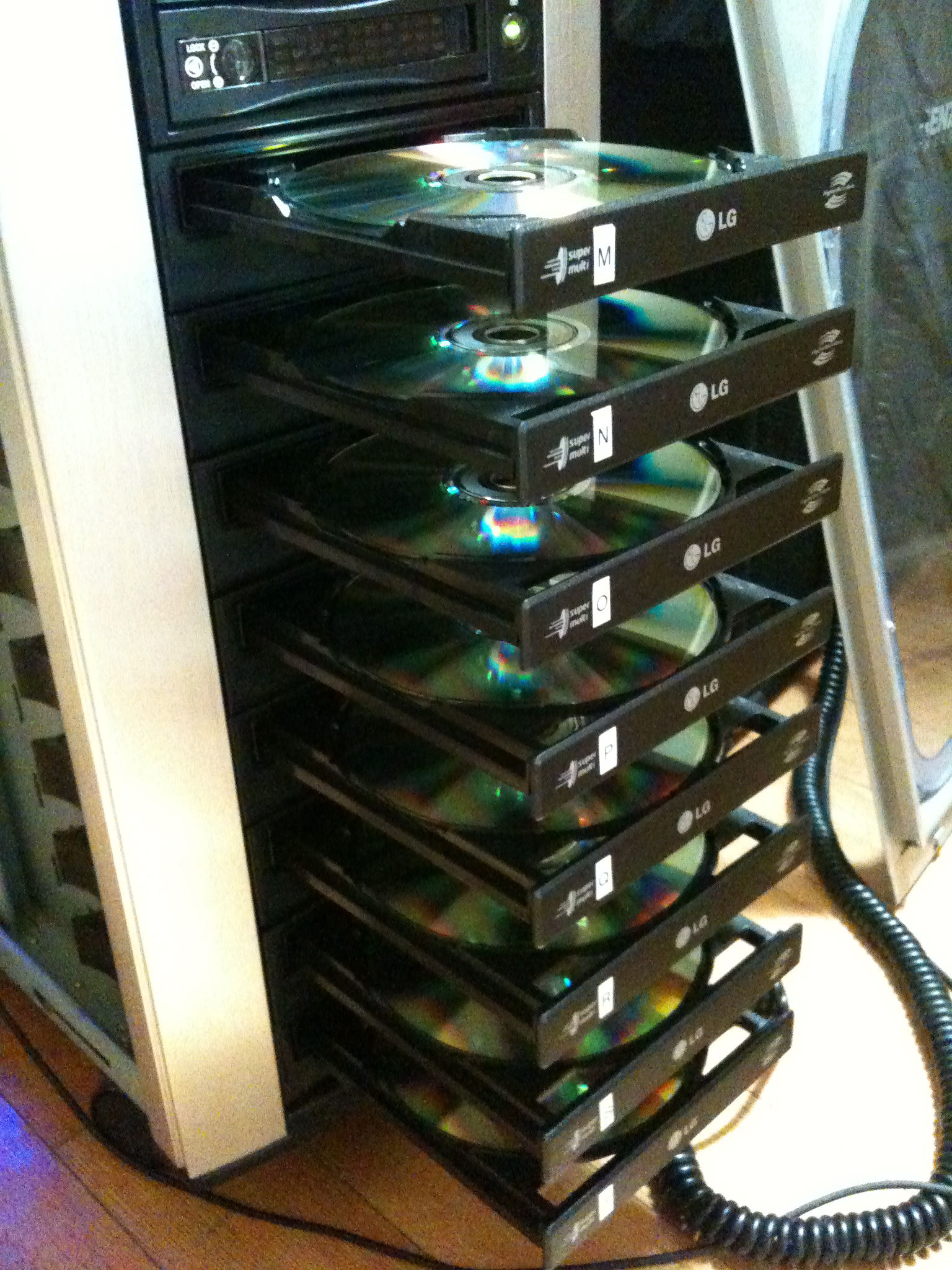
    This do-it-yourself replicator features eight Lite-On CD/DVD burners. By flipping the disc over you can burn images onto the top using the drive lasers.

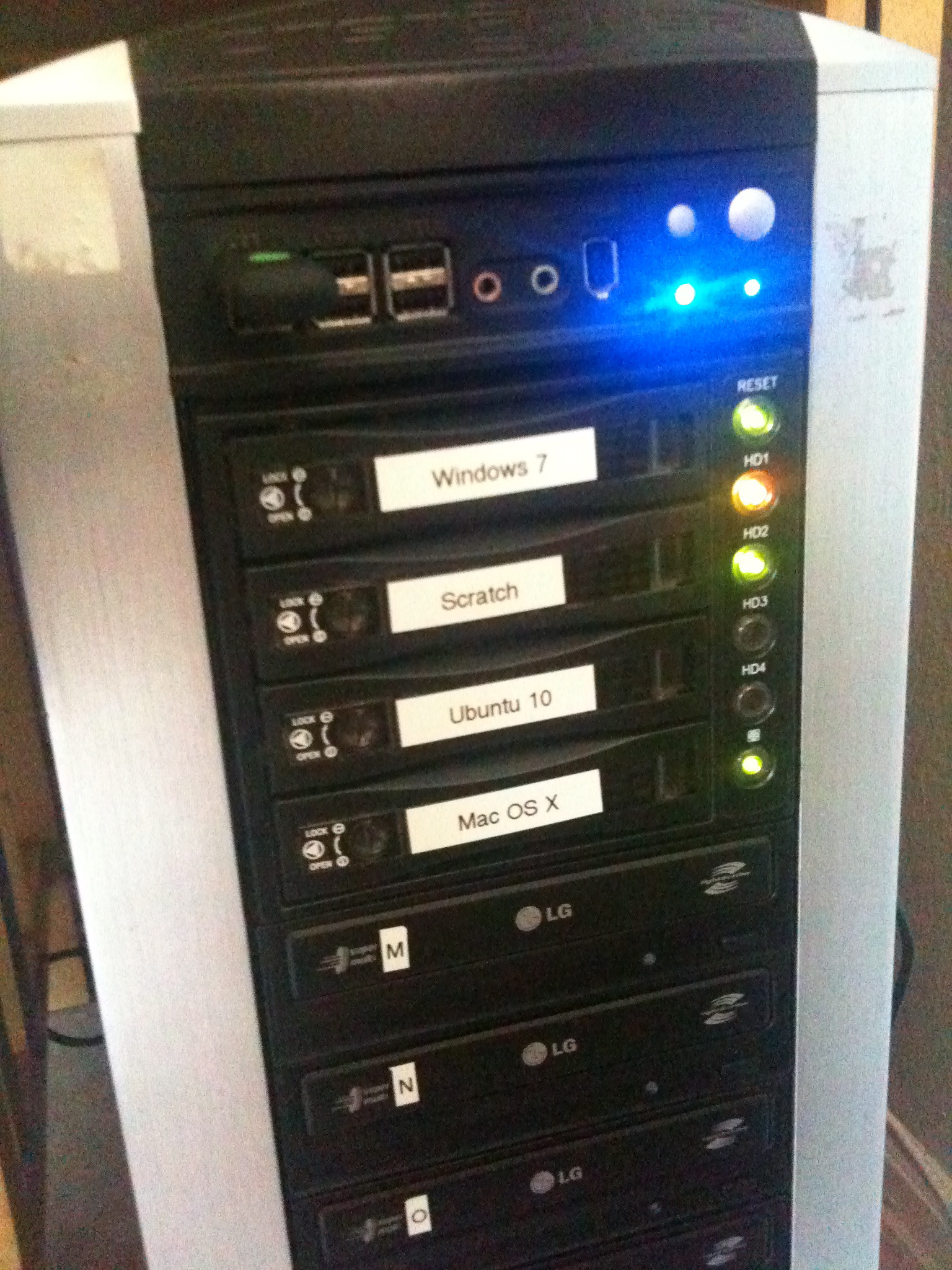
    I’ve slowly updated components of The $1K Home Studio over the last few years, but have never had a low-cost, DIY solution for disc replication. After playing with external CD burners and evaluating various proprietary hardware options such as the Aleratec auto-flip burner , MicroBoard tower replicators amongst many others, I decided that the current commercial solutions are nice, but most definitely overpriced. So I decided to develop my own solution. This custom-built behemoth is built from common off-the-shelf (COTS) hardware from Fry’s Electronics and inexpensive commercial software. It costs less to own than commercially branded replicators, and also functions as a normal desktop computer since it runs Windows 7 and Linux. (I took care to also buy a Gigabyte-brand motherboard that supposedly supports the OSx86 (“hackintosh”) project, but have had little success with the installation.)

    Hardware

    • Intel i5 750 64-bit CPU. (Features 4 cores.)
    • 4GB RAM.
    • 8 x (yes, eight) Lite-On CD/DVD 5.25″ SATA burner drives.
    • Gigabyte motherboard with lots of SATA ports.
    • Add-on SATA card. (Most motherboards won’t have enough connectors, especially if you have 8 x burners plus 4 x hard drives. 🙂 )
    • Big-ass power supply. (The first one I bought wouldn’t even boot the thing. I put in a monster and everything started working.)

    Software

    The point of all these burners is to burn simultaneously to all of them, but Windows 7 and OS X cannot do this out of the box. Only a small subset of CD/DVD burning software on the market supports parallel burning, and some only seems to support multiple burners for specific types of burns. What’s worked best for me so far is…

    • Nero Multimedia Suite 10 for concurrent audio and data burning with multiple burners. You don’t have a lot of easy-to-use alternatives here, and I’ve also noticed a few glitches with Nero. Keep your eye out for sales here and you can pick up a copy dirt cheap.
    • Acoustica CD/DVD Label Maker for concurrent LightScribe replication across multiple burners. Again, not a lot of options here. The free software from LightScribe.com does not support multiple burners, though some vendor-specific bundles seem to. (LaCie’s LightScribe software in particular appears to support simultaneous LightScribe burns, and they also have a Mac version. I would have went with a Mac-based solution, but 8 x USB 2.0 drives probably would not work so well.)
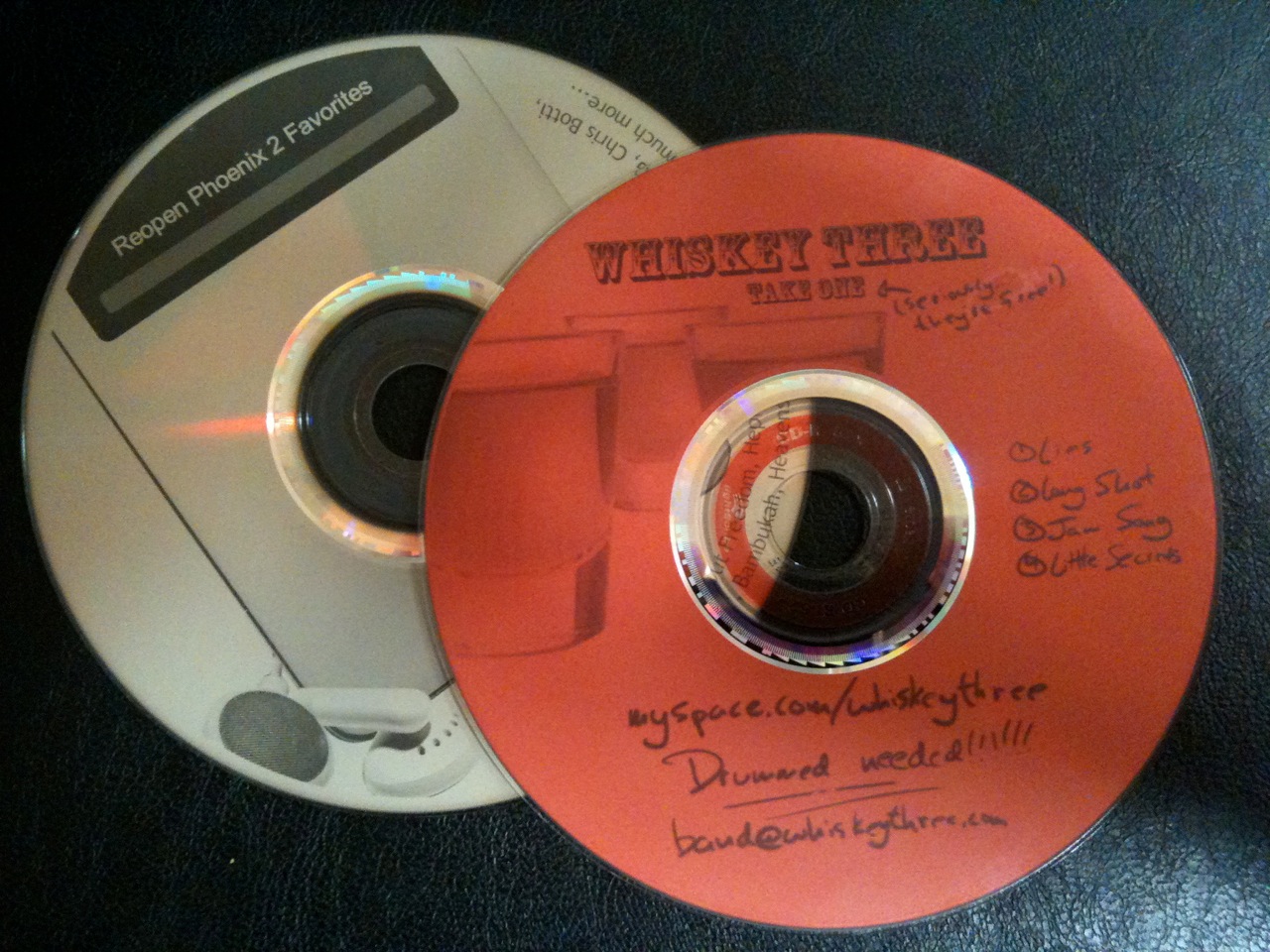
    CDs burned with LightScribe technology. Discs come in many different colors.

    I decided to create all my replicated discs using LightScribe technology. This allows me to flip LightScribe CD-Rs upside-down in the burner and use the laser to burn custom graphics onto the top of the disc. I also made the command decision to use COTS cd sleeves instead of CD Jewel cases or slimline cases. The plastic ones are more expensive, always crack, and are pretty much useless from the start since most people seem to rip their CDs nowadays anyway. Sleeves protect the disc, come in many colors, are far less expensive, even cheaper in bulk, and perhaps best of all can be printed on directly though ordinary laser and ink jet printer.

    The system runs Windows and Ubuntu. Additional drives are interchanged using hot-swap SATA drive modules.

    System Pros

    • Inexpensive initial fixed cost of hardware parts and software licenses.
    • Inexpensive variable cost per disc since LightScribe labeling uses the drive laser instead of ink. There are no costly consumables to replace. (Ordinary LightScribe media purchased in bulk works great.)
    • Quick data, audio and LightScribe replication using 8 concurrent burners.
    • Doable by anyone capable of building of PC with a little time can build one.
    • Functions beautifully as a normal desktop computer.

    System Cons

    • Not completely automated like some commercial units because disc loading, unloading and flipping (if using LightScribe) is a manual process.
    • Still uses CD-Rs. These are not the same as commercially pressed mass media discs, but a lot cheaper.
    • (This one is only applicable to audio.) I’ve yet to find inexpensive parallel burning software that can handle DDP images. (The standard in “Red Book” audio CD mastering.)
    • Since LightScribe labeling uses the drive laser instead of ink, disc labels are grayscale only. (Note: You have a lot of options in disc color, though, so it’s not a big deal. Just use your creativity.)

    Replication Process Overview

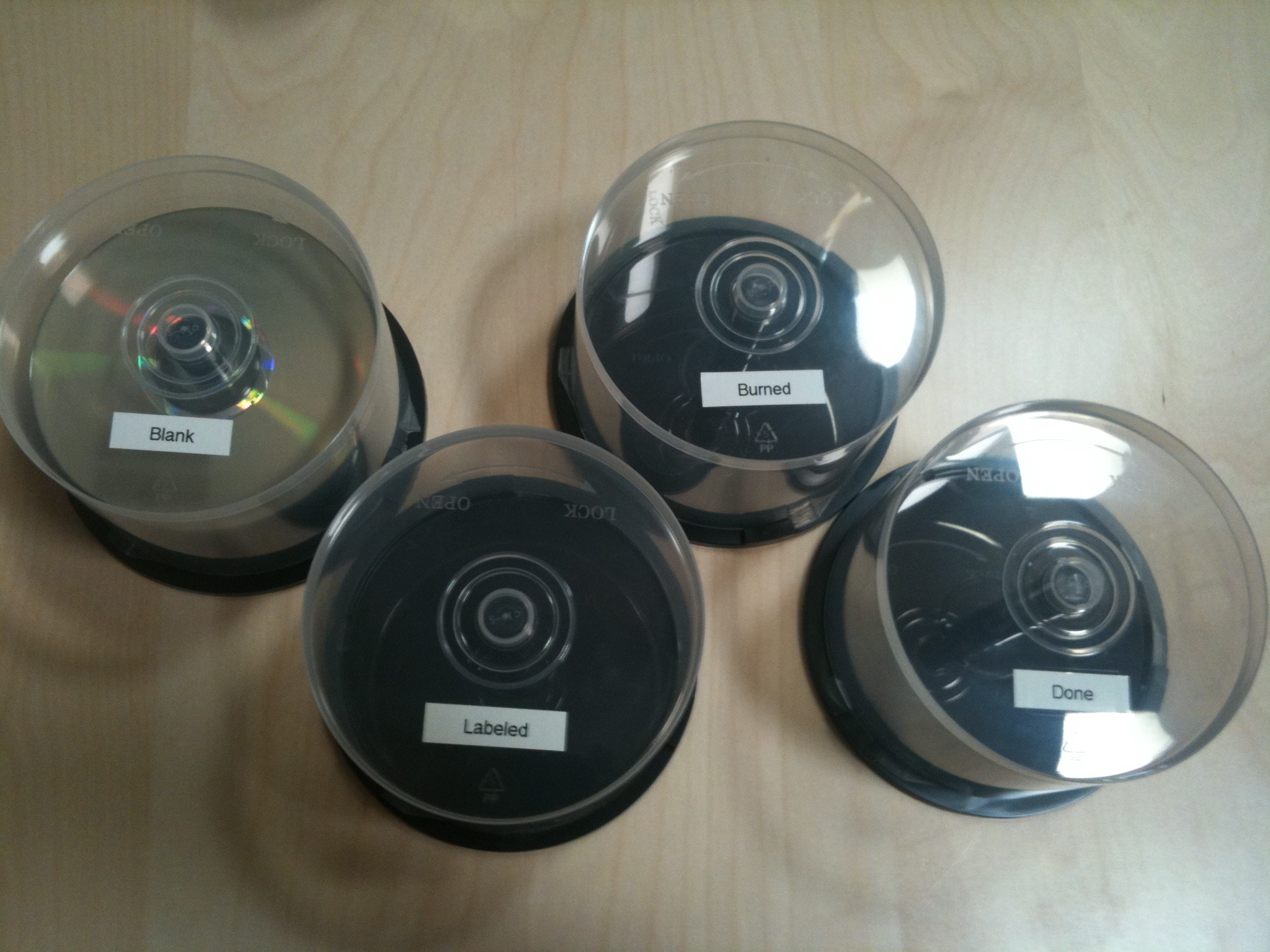
    Label four empty CD pancakes to manage the assembly line replication process. If you don’t you’ll get your disc piles confused!

    My primary purpose for this buildout is to replicate audio CDs as quickly as possible for Sonic Binge Records: the awesome music production company. In particular, I need to quickly replicate a pancakes worth (usually 25-50) of audio CDs as inexpensively as possible. After much trial and error with the process, this is what I’ve found works best.

    1. Create final CD master image. (For me that’s using WaveBurner on a Mac. For replication purposes it doesn’t really matter as long as the master is good.)
    2. Take four empty CD pancake containers and label them “Blank”, “Burned”, “Labeled”, and “Ready” to create an assembly line process. You can of course save these for future jobs.
    3. Use Nero Burning ROM to replicate batches of 8 at a time. When they’re done, be sure to put them in the “Burned” stack so you don’t get burned discs confused with “Blank” discs.
    4. While they’re burning, create a square grayscale graphic for LightScribe burning. (Free label creator software is available, though anything like Photoshop works too. I usually use a combination of Photoshop and Acoustica.)
    5. Use Acoustica to label batches of 8 at a time. Each batch will take a while. Full-disc burns seems to take around 30 minutes per batch: much longer than the data/audio side of a standard CD-R. Moved discs to the “Ready” pile when they’re done. (Note: The “Labeled” pile is for discs that have been LightScribe labeled but not burned with data or audio. You can end up in this situation when using multiple computers to do burning.)
    6. While they’re burning, use your favorite document application to design your printed CD sleeves. I’ve started buying color variety packs in bulk packs of 300 to keep options high and costs down.
    7. Bulk print the entire order of sleeves in a single run. As long as you can set the size of the feeder tray, your existing feeder should work fine. (CAUTION: remember that the “window” is made of plastic, and can melt if exposed to heat. Think twice before trying your laser printer. 🙂 )
    8. Take discs from your “Ready” pile (as they finish getting labeled) and slip them into sleeves to create the final product, suitable for general distribution. The imaging lasering adds a great, distinctive touch, and of course you can get as creative as you want with the sleeves, too.
    9. Done! (aka beer time.)

    Costs

    • Fixed: ~$1K for the machine build, with about $400 of that just for the burners. I reused/reposed parts from old junker machines where I could, and could have saved some money by buying online. I was in a rush and just went to the store.
    • Variable: Roughly $0.40 – $1.00 per disc, depending on the disc quality, packaging, ink etc. you decide to use for each project. (All things considered, the $0.40 version looks pretty decent!)

    Closing Thoughts

    If you’re a musician without computer skills I would not recommend attempting this project, but if you feel fairly comfortable putting together machines, it’s honestly not that hard. It’s just a PC, after all. (Disclaimer: I do have a degree in Computer Science and Engineering, so my perspective of “not that hard” may be a bit skewed.)

    I hope you’ve found this rough how-to guide both inspirational and informative. It’s very useful to have a replication machine handy, and if you’re actively working with people on projects intend for distribution it’s a great investment!

    Please use this comments section for all your general comments and questions and I’d be happy to address them. Thanks for reading!

  • Book Review of DIY U: : Edupunks, Edupreneurs, and the Coming Transformation of Higher Education


    Question: If I complete my general physics and mathematics studies using freely available MIT OpenCourseWare content on my own time, computer science study on campus at ASU Polytechnic, and general education requirements at UoP, all for a degree program at Berkeley, what’s wrong with that? After all, as long as I can demonstrate the competancies outlined in its program of study, isn’t this effectively more-or-less the equivalent of the Berkeley-delivered version costing possibly 10x more in total? Good for me… right? And if so, who cares?

    Answer: Hundreds of years of authoritative people vetted in an aggrandizing aristocracy of exclusionary education. That’s who.

    Universities best interests are not necessarily aligned with those of students, and as DIY U explores, the differences can be disheartening to the point of infuriating. Given a long-established tradition of prestigue through extreme selectivity and absurd financial requirements, it is understandable that many universities are struggling to find their way in the Information age.

    I enjoy looking at political issues though numbers, statistics, historical analysis, and really any sort of empirical evidence lending insight to the world around us. With regards to education, it is obvious that we have yet to fully realize how Internet-enabled technologies fundamentally change how we should perceive learning, and due to the explosive growth of exploratory online systems it is critical we define realistic paths to evolve traditional, costly, centralized, campus-oriented, course-based university programs to the increasingly decentralized, affordable, online, multi-national, outcome-based demands being pushed by current generations of students. DIY U investigates this gap using historical evidence, anecdote, current statistics, and critical analysis: exactly the type of writing I look for in subject matter of high debate.

    Of particular interest to me are the many statistics on past, current, and projected future costs of higher education. Not that this should be shocking, but the gist is that the current model just isn’t going to work if we really want to positively improve the general education level of the American population. (And I think the whole world would nod in violent support of this goal.) Simply using federal subsidies to (attempt to) expand an already antiquated model of education would be outright foolish.

    I also particularly enjoyed the sections on different paradigms actively being used to varying degrees of success, specifically outcome and competency assessment-based learning. I’ve attended four higher-ed schools to date, and find the requirements of having to take specific course line numbers at a specific college for a specific degree program within a single university in the 21st century to be unacceptably, and quite literally, “old school”. As someone who’s said “I could have tested out of that class” numerous times, the concept makes sense to me.

    If you find these topics interesting, by all means pick up copy of DIY U: Edupunks, Edupreneurs, and the Coming Transformation of Higher Education. I purchased my Kindle version for about $10 on Amazon.
  • 3D OSX Applications With Ruby-Processing Screencast

    A two-part screencast series demonstating two different 3D ruby-processing applications. A slide presentation from 2009 created for the Phoenix Ruby Group is also attached as bonus material. Enjoy!

    Part 1: Starfield

    Demo of a 3D starfield simulation written in pure Ruby, running on the JRuby runtime as a nicely packaged .app program for Mac OS X. (Runs on Snow Leopard and Leopard.)

    Part 2: Twiverse

    3D Twitter client written in pure Ruby, running on the JRuby runtime as a nicely packaged .app program for Mac OS X. (Runs on Snow Leopard and Leopard.)

    Slide Show

  • Free Copy Of Portal With New Mac Steam Client

    Got a Mac? Like games? Great news! Value’s “Steam” software finally launched for Mac, allowing you to purchase some great gaming titles on your OS X machine. When a game is available on multiple platforms, a purchased license appear to be portable as well. And as a launch promotion, Value is giving away free copies of “Portal” (an awesome title in its own right) through May 24th, 2010. Grab it!

  • Mini-Review: Meltdown: A Free-Market Look at Why the Stock Market Collapsed, the Economy Tanked, and the Government Bailout Will Make Things Worse


    Meltdown: A Free-Market Look at Why the Stock Market Collapsed, the Economy Tanked, and Government Bailouts Will Make Things Worse by Thomas E. Woods Jr.

    My rating: 5 of 5 stars
    Meltdown is a evidence-based, academically credible, and brutally honest analysis of the causes and effects of economic depression faced in the United States since the early 1900’s. Thomas Woods’ almost adversarial opinion of the Federal Reserve is approached via many different approaches and data sources, as is his affinity of Austrian business cycle theory. (As opposed to Keynesian economics primarily seen in the U.S.)

    For those with interest in macroeconomic theory or the effects of government intervention on both business and individual finance, this is absolutely required reading. Those with politically libertarian leanings will also find many of the facts presented within outright shocking. I personally finished the electronic version of this book with over 10 pages of highlights, and plan to continue following Woods’ work.

    View all my reviews >>

  • MacPort MySQL “Can’t find file: ‘./mysql/host.frm’” Error

    I recently set up a new Mac OS X Snow Leopard laptop for software development purposes. After going through my usual MacPorts installation and installed MySQL using the following steps

    1. sudo install mysql5-server
    2. sudo cp /opt/local/var/macports/software/mysql5/5.1.44_0/opt/local/share/mysql5/mysql/my-medium.cnf /opt/local/etc/mysql5/my.cnf
    3. sudo -u mysql mysql_install_db5
    4. sudo launchctl load -w /Library/LaunchDaemons/org.macports.mysql5.plist

    A few days past, and one day I notice that launchctl was loading the script, but `nmap localhost` did not show the the process listening on port 3306 as expected. I looked at the log file:

    sudo tail -f /opt/local/var/db/mysql5/preston.local.err

    ..and noticed it was terminating with the following errors:

    100331 12:05:30 [ERROR] /opt/local/libexec/mysqld: Can’t find file: ‘./mysql/host.frm’ (errno: 13)
    100331 12:05:30 [ERROR] Fatal error: Can’t open and lock privilege tables: Can’t find file: ‘./mysql/host.frm’ (errno: 13)

    100331 12:05:30 [ERROR] /opt/local/libexec/mysqld: Can’t find file: ‘./mysql/host.frm’ (errno: 13)100331 12:05:30 [ERROR] Fatal error: Can’t open and lock privilege tables: Can’t find file: ‘./mysql/host.frm’ (errno: 13)

    After a considerable amount of grief I evertually discovered that the contents of /opt/local/var/db/mysql5/ need to be owned by the appropriate mysql user (in my case “_mysql”), but some files were being owned by the “root” user. After correcting all file ownership and restarting the service…

    1. sudo chown -R _mysql /opt/local/var/db/mysql5/
    2. sudo launchctl unload -w /Library/LaunchDaemons/org.macports.mysql5.plist
    3. sudo launchctl load -w /Library/LaunchDaemons/org.macports.mysql5.plist

    Everything now seems to work fine again. Hope this helps!

  • Getting iTunes To Convert/Export/Bounce To Other File Formats

    You’d think iTunes 9 would have a menu option to convert selected, non-DRM’d files to .MP3, .AAC and such. It doesn’t, but there’s a quick–if not silly–workaround to get iTunes to covert your tracks to a supported format.

    Mac instruction for iTunes v9

    1. Open Preferences -> General -> Import Settings. Change the “Import Using option to the format to which you want to convert.
    2. Within iTunes, select the file you want converted.
    3. Under the “Advanced” menu, you should now see a “Create XYX Version”. Click it and your selected file(s) will be converted in the background while retainer your originals.
    4. Remember to change your import preference settings back to normal!

    Done. 🙂

  • Get Your Kindle’s PID In 10 Seconds

    Rather than struggling with a bunch of old command-line scripts to calculate the Personal ID (PID) of your shiny new Amazon Kindle, I’ve released a super-freakin’-easy webapp to do it for you in a matter of seconds. No joke.

    Simply visit http://kindletools.prestonlee.com, follow the instructions, and be sure to gift me a short novel to say “thanks”. 🙂

    Update: See Jer’s post on the bigger process of converting Kindle books.