Home Contact Sitemap

Preston Lee

Founder, CEO, OpenRain.com

About

During the day I run OpenRain in Phoenix: a Ruby on Rails development shop. During the night... well... I still have to run OpenRain, but when I find time to breath, I exhale here. If you'd like to get in touch professionally, don't hesitate to contact me via the OpenRain website.

Peace,

Preston

Book Review: Digital Astrophotography, by Stefan Seip

Rocky Nook – a digital photography book publisher in California — sent me a review copy of Digital Astrophotography: A Guide to Capturing the Cosmos for review, which I read over the last few months.

Pros


  • A good overview of the techniques used in astrophotography.
  • Well illustrated.
  • Inexpensive.
  • Largely easy to follow for the casual reader.
  • Covers the entire process, from equipment to post-processing. I’m very well oriented with “typical” production and post-production photography methods, but was unaware of the additional complexities and tools involved with astrophotography.  


Cons


  • Casual SLR/DSLR and point-and-shoot users will not be able to suddenly get stunning frames of the night sky. It turns out that the equipment required to get decent shots requires a level of financial commitment to the niche you aren’t likely to make unless you have a professional need or really, really, REALLY like looking at celestial bodies. You’ll probably need a special mount for your camera, or build a jig yourself. I did not want to invest a significant amount of money, so I have been unable to try many of the techniques described.
  • If you’re bad at math, you may find some of the technical setup difficult to follow.  
  • The tools covered are Windows applications. Bah. 


Recommendation

Buy if..


  1. You’re serious about becoming astrophotography and have the cash to pony up for specialty hardware, or
  2. You are not planning on trying it for yourself but nevertheless have $20 of curiousity.


Share/Save/Bookmark

Tags: , ,

. 23 May 08 | Photography | Comments (0)

Skype Phone Reviews: IPEVO SOLO, FREE.2

solo_3.jpgWe‘ve recently started using Skype hardware by little-known vendor IPEVO. SOLO models for the desktop (pictured) and FREE.2 USB handsets for the road. The SOLO plugs straight into your ethernet network, and also functions as a tiny ethernet switch, providing a port for your computer if you only have one RJ-45 jack at your desk. It took me less than 5 minutes to get running with no “Quick Start Guide” crap or drivers required. Since I already had a fully juiced Skype account, the SOLO logged in flawlessly with no hassle. Happiness ensued.

The full-color screen is easy to read and the angle can be adjusted. Unlike more “enterprisey” phones, there is no excess buttonage, and the unit in general is very easy to figure out and use. Despite a couple minor nitpicky items (could be easier to access voicemail, not enough speed-dial stuff, needs conferencing built in), the SOLO is a solid practical phone at less than $200 (USD) per seat.

I’m less fond of the FREE.2. I suppose it works well for what it is, but I don’t like having to think about starting special software to take advantage of all the features. Everything should Just Work without having to worry about additional moving parts. (Oh, and everything should integrate flawlessly with Address Book too.) The hardware itself seems to work well enough, but until the software side is more streamlined and polished I’ll likely stick to headphones and the MacBook Pros built-in microphone.

IPEVO also offers a dedicated conference unit named XING which we may pick up in the future, but have not played with so far.

Share/Save/Bookmark

Tags: , , , , ,

. 08 Jan 08 | Computer | Comments (4)

Small Office VoIP: Skype Pros/Cons

skype_logo.pngBefore the 2007 tax year ended, OpenRain decided to finally solidify a telephony strategy for the next year or so. Key requirements were..

  • Easy ad-hoc and scheduled conferences.
  • Mobile flexibility and continuity across physical locations.
  • Scalability for the next couple years.
  • Voice mail
  • Call forwarding.
  • Little to no management overhead. (I don’t want to run a dedicated PBX.)
  • Usable hardware.
  • Practical prices for worldwide incoming/outgoing calls.
  • Less than ~$2K initial investment.

It came down to one of two primary directions..

  1. Hosted VoIP (such as with Vonage or Qwest) with SIP phones such as from Cisco or Avaya.
  2. Skype with 3rd-party hardware and Mac soft-phone.

After some debate, we chose to use Skype exclusively for services, and have been fairly satisfied. I have a few beefs, but at less than $100 per year per person, I can’t complain too much.

Skype Pros:

  • Instant gratification. Easy to set yourself up for calls to/from landlines.
  • Good soft-client with videoconferencing support; Address Book.app integration is present in the latest Mac beta client.
  • Inexpensive. Less than $100 per seat per year for SkypePro and SkypeIn (an incoming number).
  • Awesome value when bundled with an IPEVO SOLO.
  • Extremely simple web interface for distributing company credits.
  • Concurrent logins from multiple locations. I leave my SOLO on 24/7 and use the soft-client on the road.
  • Great quality on Skype-to-Skype calls. Good quality to landlines.

Skype Cons:

  • My biggest gripe: In the U.S., outgoing calls do NOT show your SkypeIn number on the recipients phone.
  • Vendor lock-in, since Skype uses a proprietary protocol. Since cost of entry for services is so low, however, it may not be a huge deal if your want to switch to a SIP-based provider.
  • The WiFi-Phones all suck. The IPEVO SOLO is the only desktop model I like.
  • Possible future screwage of SkypeIn numbers if they ever change.
  • No 911, which is a general issue with VoIP services.

Share/Save/Bookmark

Tags: , , , ,

. 04 Jan 08 | Computer | Comments (0)

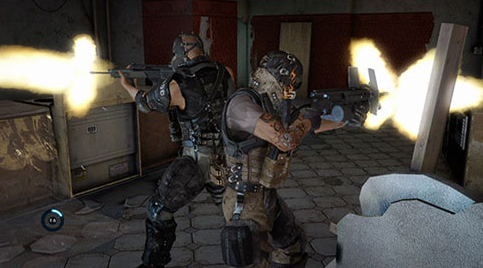
Mass Effect: Holy Freaking Crap

picture-7.pngI figured I’d have some “me” time this weekend, so I picked up a copy of the highly praised Mass Effect. Saying it’s good is obvious; awesome is an understatement. Groin-grabbingly enthralling, genre-shattering entertainment is somewhere in the neighborhood. We’re talking a contender for best video game ever here. So if you’re last minute Christmas shopping for a 360 owner (possibly yourself), I can’t recommend Mass Effect highly enough.

The gameplay itself is difficult to describe. Take the fun parts of leveling, storyline, voice acting and small squad combat RPG elements from Baldur’s Gate, the pace, feel and vehicle action of a FPS squad combat shooter, and drop that into an incredibly rich sci-fi backdrop of a Star Trek episode. Awesome sauce!

Share/Save/Bookmark

Tags: , , ,

. 24 Dec 07 | Computer, Personal | Comments (2)

Xserve w/Leopard Server (Mac OS X 10.5), First Impressions

picture-4.pngWe just picked up a refurbished 2.66GHz quad-core Xeon from Apple, which we’ll be using for internal infrastructure. (We’re in the process of migrating from a mix of Solaris and Linux). After about 8 hours of learning the ins and outs of Leopard Server over the weekend, we had the box running Open Directory (Kerberos and OpenLDAP), DNS, AFP, SMB, FTP, domain account and machine management, mobile home directories, MySQL, Software Update, Xgrid controller, Wikis, Blogs, iCal and VPN services, all tightly integrated with single sign-on (via Kerberos) into a sexy 1U package.

  • Xserve (refurbished discount, direct from Apple): ~$3K
  • 3 x 750GB Disks (Newegg): ~$450
  • 2 x Apple Drive Module (direct from Apple): ~$380
  • 2 x 2GB FB-DIMM RAM (Crucial): ~$300
  • Infrastructural sanity: priceless. (…or ~$4.5K after tax and random small stuff)

That’s some serious value considering how much of a PITA setting all this up can be in Linux (or whatever) without vendor support, and far cheaper than paying a Systems Administrator in the long run. The Server Admin and Workgroup Manager tools are pretty freakin’ usable, too, relative to the internal complexity of the system. I’m a happy camper for now… let’s see if it lasts.

Share/Save/Bookmark

Tags: , , , , , , , , , ,

. 10 Dec 07 | Computer | Comments (0)