Blog

  • Please Stop Saying "Google Simple"

    It should be generally assumed that designs should be as simple as possible. So if you’re working directly with a competent designer, you need not say so. If your designer does not hold this as a core working principle, get a new one.

    Client: “We’d like you to design a next-generation car dashboard for our new line of luxury vehicles. The car will feature all the latest gizmos: GPS, iPod integration, satellite radio, automatic environmental controls, you name it. And the interface needs to be simple. Google simple.”

    Me: “Ok.. here’s what we’ll do. We’ll remove the wheel, pedals, and all conventional buttons and displays. Instead, we’ll mount an LCD to the dash, and display a single text input box. Voice recognition will fill in this box for the driver, and when (s)he says “Search”, the car computer will return the first 5 million commands (s)he most likely meant. The driver can then touch the command which they meant and have it execute. Alternatively, the driver can say “I’m feeling lucky!” to have the car automatically execute the most likely desired command, such as “Turn right”, or “OMG STOP NOW BEFORE WE DRIVE OFF THAT CLIFF!!!” If the driver survives long enough, they’ll get to enjoy the lumbar support and tunes from their iPod.”

    Client: “…”

    Me: “We can call it ‘Sue-gle’.”
  • Why Outlook Sucks: Part 2 of 900,000

    Note: Yes, this is still on an older version of Outlook because that’s what I’ve had to use. Please feel free to contribute to this series in your own blog via trackback/ping, and I’ll post links en mass to the front page when I get enough!

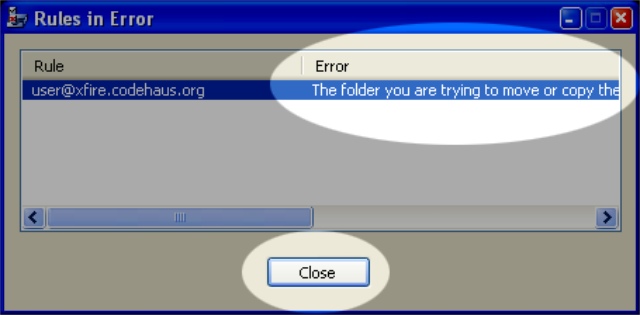
    Let’s delete a folder to which messages are directed via a rule.

    error.jpg

    Outlook does some dependency checking and found that deleting the folder will hork a rule. Good. Unfortunately we get a disgruntled little dialog box entitled “Rules in Error”. (Shouldn’t this be “Error in Rule”?) The use of a table I surmise would be to support display of a laundry list of errors, but since there’s only one in this case and the table won’t wrap the error text, we get to scroll all the way over to the right. Not that it really matters, because I don’t have a choice on how to proceed. The “Close” button gives me no indication as to what will happen when I click it.

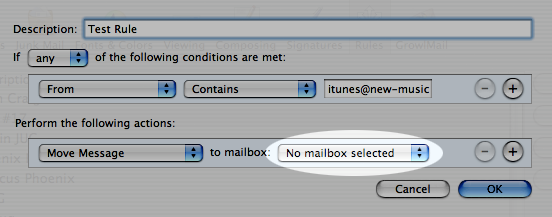
    I never have this issue in Mail.app, because when I delete a folder related to a rule, the rule automatically becomes disabled and folder reference unselected. Here’s what a simple rule looks like after you delete a folder to which it directs email.

    rule.png

    No annoying dialog, and I can easily rewire the rule since it wasn’t deleted. Also, if I create a new folder with the same name, the folder automatically gets wired into the old rule. Makes sense!

  • Advice For The Telecommuter

    If your laptop has a fan on the bottom, don’t use it when you’re naked.

    Update: Stop looking at me like that. It’s never happened. Honest. 🙂

  • Why Outlook Sucks: Part 1 of 900,000

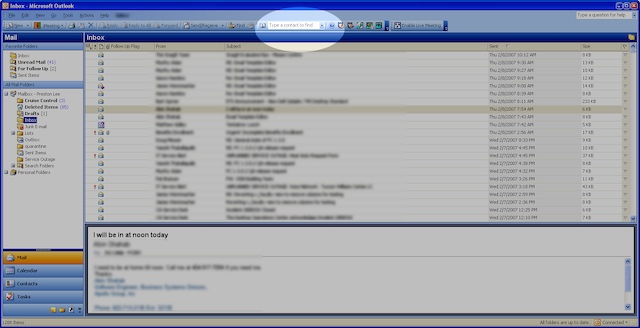
    Let’s find an email from Toni regarding her party next weekend. There appears to be a search box in the toolbar.
    full.jpg
    Wait.. that seems to be only for contacts. Nevermind.

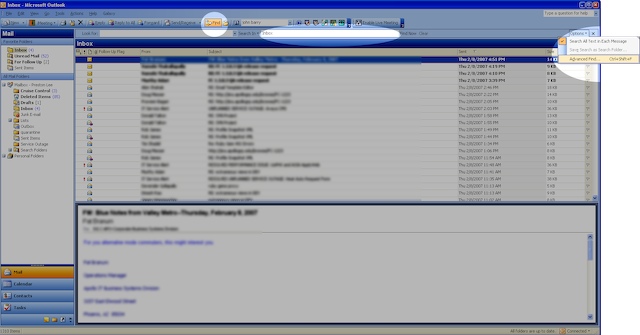
    menu.jpg

    There’s a find button to the left which brings up a toolbar, but it appears to search only the Inbox. Unfortunately I have a bazillion folders and rules and have no idea where the message is located, so I’ll go over to the “Options” menu (of all places) and start an “Advanced Find”.

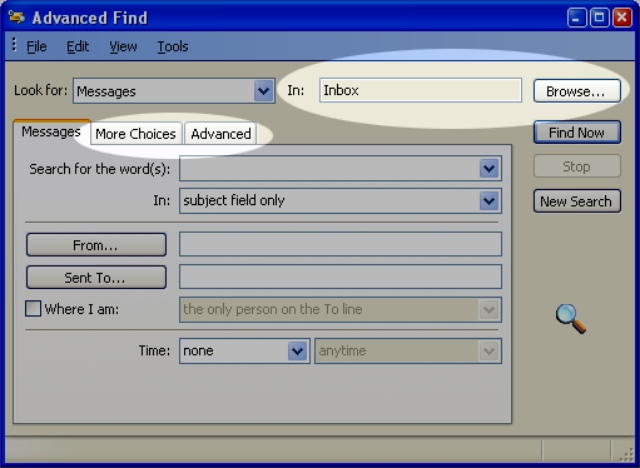
    advanced2.jpg
    Uh.. ok. I have no idea why I need “More Choices” or “Advanced”, and apparently I’m still searching only the Inbox. Let’s “Browse”..

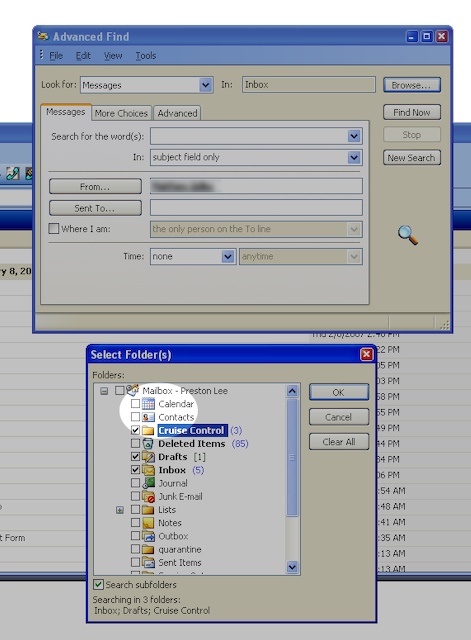
    select.jpg

    Now that we’ve systematically selected every possible place the email could be–which could apparently be in my Calendar or Contacts–we can click OK and go back to the “Advanced Find” dialog and click ‘From..’

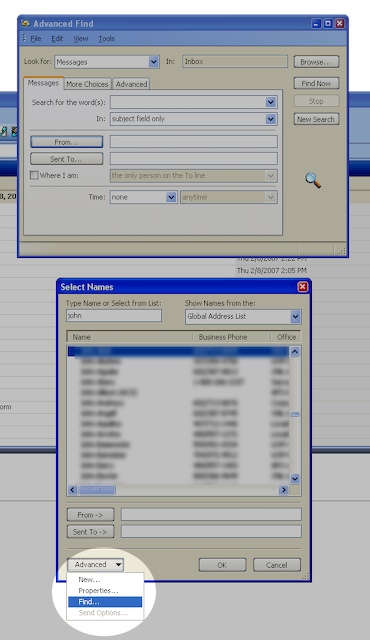
    sub.jpg

    Great.. the engineers decided to reuse the same old contact finder dialog. There are a lot of people with a ‘Toni’ in their name, so we’d better embark on a separate sub-find quest to identify the correct contact record. Make sure you click ‘Find Now’ and not ‘New Search’ when you’re done.

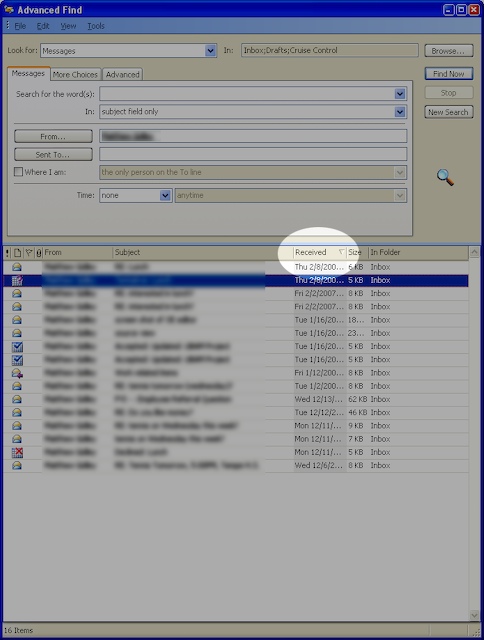
    res.jpg

    When we come back from a coffee break, we see Outlook proudly presenting a result set, sorted by date, most recent first. That’d be great, except that if I’d received it recently, I probably wouldn’t need to use an ‘Advanced Find’ to locate it, would I? The results are also displayed within the dialog for some reason instead of the main window, so I guess I’ll have to keep this up on my second LCD, which I’ll now repurpose as the “Dedicated Advanced Search Dialog Monitor”. Whatever.

    Just for shiggles, let find an email in Apple’s Mail.app.
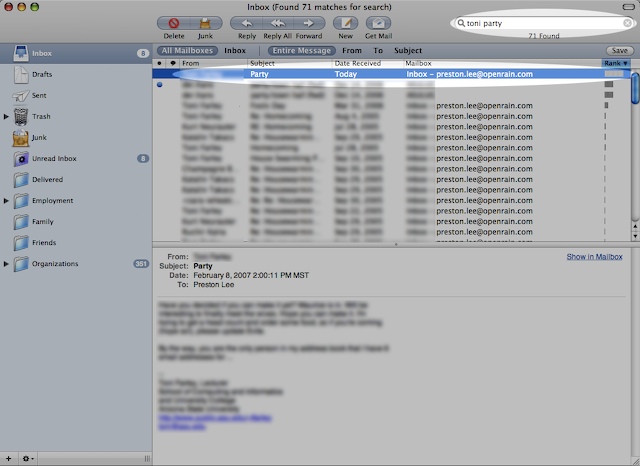
    picture-1.jpg
    Holy freaking crap. I typed in ‘toni party’, and it gave me emails from Toni about her party, sorted by likely relevance. It was immediately clear how to search and the results took less than a second to display, despite the fact the PC is apparently faster spec-wise and I have magnitudes more email on my MacBook Pro. Huh.

    Update: Part 2 of 900,000

  • Conspiracy Theory: Blue Man Group Recruits Seth Godin

    When I saw Blue Man Group at the Venetian I knew one of them looked familiar. It was none-other than entrepreneur Seth Godin! Ok, probably not. But there is a resemblance, no?

    Seth Godinseth_godin.jpg

    Blue ManBlue Man

  • Configuring Rails To Use Gmail's SMTP Server

    OpenRain.com uses Google Apps For Your Domain, and all email flows throw Google’s servers. Unfortunately, Rails 1.2.2 can’t send via smtp.google.com out of the box. As originally pointed out by Anatol Pomozov there is a solution. Here’s the simple version tested with Rails 1.2.2.

    1. Save this code as lib/smtp_tls.rb within your rails app.
    2. Add this code to config/environment.rb.
    3. Use ActionMailer as normal.

    Updated 2008.01.04: The original link was b0rken, so I pastied the code instead.

  • DSLR Camera Body vs. Lens: Where To Put Your Money

    Absolutely put more of your cash into the lenses. As much as it hurts to think about, you’re probably going to trash the body long before an equally priced lens. A good lens will also hold its value relatively well, even when the lens model is updated. (Nicer used Canon EF lenses aren’t easy to find deals on since they’re quickly bought; I’m constantly searching.)


    I’m a Canon man, and I’ve tried some of the kit lens. They’re absolute crap. Images appear soft and with an annoying amount of chromatic aberration. Sigma’s lower-end equivalents such as the Sigma 18mm-50mm 3.5-5.6 DC Zoom are similarly poor. This crop of an overhead florescent light in the corner of a much larger frame shows how extreme the chromatic aberration can be with the Sigma model.

    sigma-zoom.jpg

    While admittedly blown out, there is a very distinct purple color cast in the areas directly above and to the right of the lighted area. This was shot at f/3.5, 1/80s at ISO400 at 18mm (x1.6 sub-frame conversion).

    I’ve been completely satisfied with my Canon XTi and Canon EF 28-135mm f/3.5-5.6 IS USM. The 28-135mm is a great general-purpose, budget-friendly image stabilized (IS) walk-around lens. Image stabilization is well worth it, as you can get away with many hand held shots in low light or moving subject conditions which ordinarily aren’t possible.

  • ..But *Should* You Fix That Bug?

    ladybugWe have a natural desire to fix things. As engineers we find satisfaction in resolving technical problems and, if you’re following test-driven practices, keeping them resolved. These thoughts flow through our minds as the primitive keyboard-wielding code monkeys we evolved from. What distinguishes us from our fecal-flinging counterparts, however, is our ability to question these instincts and wear business, user and developer hats simultaneously. Here are some additional questions we should consider before immediately reacting with technobabble.

    • What business value could be realized by addressing this issue? It would be ideal to resolve it, yes, but is there any ROI for the time spent?
    • How risky is this? If cleaning the big red button could potentially fire the nuke, you might want to leave the booger on it.
    • How critical is this issue? If sufficient workarounds exist or this does not prevent people from working, perhaps you could move it below other todo list items that are.
    • How does this make users feel? Requiring the user to click OK every two minutes will create desire to stab you with a sharp object. Your death will generate bad vibes around the project.
    • What is the business impact? If the tree fell, but nobody lives in the woods.. what tree?
    • What are the dependencies and dependants? Superman requires his tights be dry-cleaned before saving the planet today. You might want to run to the dry-cleaners.
    • When could a resolution actually be delivered? It may take 2 minutes to fix, but if users can’t get it for two months perhaps the work can be postponed.
    • Who is be most appropriate person to handle it? Maybe it’s you. Maybe it’s the guy who actually wrote the code.
    • What actually needs to be fixed? Don’t replace the alternator if you only need a battery.
    • Where does this fall in the project timeline? If the next deliverable is already late, you might need to rescope by sitting down with the business and reevaluating what is truly necessary.
  • Arizona Desert: Usery Mountain Regional Park

    These are a few of my favorite shots from Usery Mountain Regional Park over the last year. All were taken in color on a Canon XTi using a 28-135mm EF lens, but are presented here with no color saturation to allow for more dramatic contrast adjustments.

    usery-mountain-3.jpg

    usery-mountain-4.jpg

    usery-mountain-2.jpg

    usery-mountain-1.jpg

    usery-mountain-5.jpg

    usery-mountain-6.jpg

  • The $1K Home Recording Studio Mac Add-on

    Update 1: Check out “Making Friends With Some Guy Named Mike” on this band page of mine for an awesome example of this studio in action.

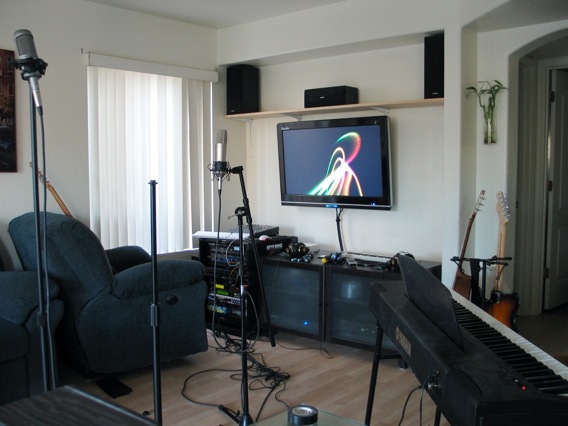
    20 years ago digital home recording wasn’t plausible. 10 years ago we started to see its potential, but most hobbyists (read: very cash-limited people) were limited to using still-primitive versions of multi-trackers such as Cakewalk, Cool Edit Pro or Cubase with either COTS Sound Blaster PCI cards or ridiculously over-priced, high-noise, high-latency specialty cards with break-out boxes such as the Lexicon Core 2. Running on Windows 95 or 98, we regularly struggled with the stability of the platform and device drivers. Today, you can have your own personal studio capable of producing DVD-quality recordings by adding a thousand dollars of equipment to your existing computer and music rig. Here’s my living room/home theater/recording studio/Mac haven, all driven by a single Mac Mini..
    home-studio-thumb.jpg
    Here’s are the core components..

    • Mac Mini (Intel).
    • Big 1080p LCD television/monitor. The Mac Mini drives this beast with a DVI-to-HDMI converter cable.
    • Logic Pro (Apple’s recording software). For my needs, it’s really either Logic Pro or Pro Tools. For various reasons I’ve stuck with Logic Pro run in a distributed manner with other Macs in the house using built-in Xgrid functionality over gigabit ethernet.
    • Headphone amp w/studio headphones. You need at least one good headphone set to properly lay down track on top of track, but when you have people over you can usually get by with three or four. This is too much load to be powered directly by the computer, so the dedicated headphone amp is necessary. I have a Behringer HA4700. (I didn’t want to add my Event 20/20 references monitors to the already cluttered layout, so I have them in another room.)
    • PreSonus FirePod. This is a truly outstanding input device for recording the entire band simultaneously. The unit is rack-mountable, connects via FireWire and optical cables, and has pristine noise-free pre-amps.
    • Microphones and stands.
    • Instruments. I have a full-size Yamaha keyboard (pictured), a bunch of vocal mics and guitars, and a rack of mediocre analog schwag. BYOI, whatever ‘I’ happens to be.

    If you’ve already got a Mac setup and some music equipment, grabbing Logic Express, PreSonus FirePod, decent vocal mic and a bunch of cables for $1K will turn your system into an audio powerhouse which your friends will envy.