Category: computer

  • Switching To Dvorak

    dvorak.png
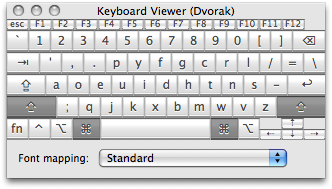
    After years of deliberation, I’m finally taking this Thanksgiving break to switch to the Dvorak keyboard layout. It’s been frustrating, yes, but I believe my wrists will be much better off with the change. Within a couple hours of switching I’m probably crawling at ~15 words per minute, which is faster than I expected. Stuff that still throws me off due to being permanently etched in muscle memory..

    • My name.
    • `cd` and my custom `ls` aliases.
    • OpenRain.
    • . (period)
    • Common commands such as cut/copy/paste, closing and opening files etc.
    • The letter ‘o’ for some reason.

    Ohh, and I switched my command and caps lock keys too, so my brain is a tad bit overloaded at the moment πŸ™‚

  • In The News

    OpenRain affiliate img surf‘s Mugr facial recognition services have been receiving some press lately. Here’s the lowdown of what’s been happening..

    Mad props to the Mugr team for the thrill ride thus far!

  • Featured In Rubyology Podcast #48

    The talk I gave at yesterday’s Phoenix Rails meeting will be featured in Rubyology Podcast #48, courtesy of Chris Matthieu. Thanks for the effort and kind words! The Mugr.com demo portion at the end got cut out unfortunately, but the meat of the technical discussion is available for your listening pleasure.
    Slides: Keynote PDF

    Listen Online or Subscribe on iTunes

  • Rails Presentation: attachment_fu, Kropper and Mugr.com face-based services preview.

    I’m giving a brief talk at tonight’s Rails meeting in Chandler at 7:00pm on what we’re doing with attachment_fu and Kropper for upcoming face-based search service mugr.com. I’ll post the slides afterwards for those who can’t make it, but you won’t get to see the Über-secret developer build unless you come πŸ™‚

    Slides: Keynote PDF

  • Rails attachment_fu/Kropper Scaling Fix: attachment_fu_skip_resize

    I recently integrated Kropper into a custom RoR application for OpenRain affiliate img surf. A fundamental flaw in the upload-save-crop-save process used by Kropper is that attachment_fu automatically scales down the image on first save to :resize_to dimensions. After the subsequent crop–which may result in a significant drop in resolution–the image is scaled back up to :resize_to dimensions: an ugly lossy operation.

    The attachment_fu_skip_resize plugin gives attachment_fu the ability to temporarily bypass resizing of the full-size original image, thus allowing your final cropped photos to be of the highest quality as possible.

    1. Install the plugin.
    2. In your attachment_fu image class, add..
      attr_accessor :skip_resize
    3. Any time you want to save an image without invoking resizing on the original image..
      image.skip_resize = true
      image.save

      Thumbnails will be generated at their defined resolutions regardless of the skip_resize flag.

  • Dynamically Generating SSL Certificates with Ruby on Rails

    OpenRain had a couple projects recently need to programmatically generate private keys and SSL certificates in Ruby. To contribute back to the community, we’re releasing several small things today.

    • SSLsicle.com A simple form which does the OpenSSL grunt work and pop outs an SSL certificate ready to use with Apache (or whatever). SSLsicle uses..
    • eassl_fix A Rails plugin which patches a small but critical bug in the eassl v0.1.1643 gem which makes OpenSSL object manipulation a bit less dense. I’ve submitted a patch (included) to the author, but as of today he hasn’t applied it. (Also, props to the JumpBox guys.)

    If you need to write your own code to generate SSL certificates in Rails..

    1. sudo gem install eassl
    2. Install the eassl_fix plugin
    3. Bust out a view for the user to enter the information that gets baked into the cert and then write a few lines in your controller…
      require 'eassl'
      key = Key.new
      options = {
      :country      => params[:csr][:country],
      :state        => params[:csr][:state],
      :city         => params[:csr][:city],
      :organization => params[:csr][:organization],
      :department   => params[:csr][:department],
      :common_name  => params[:csr][:common_name],
      :email        => params[:csr][:email]
      }
      name = CertificateName.new(options)
      csr = SigningRequest.new(:name => name, :key => key)
      ca = CertificateAuthority.new(:password => nil)
      cert = ca.create_certificate csr
      @pem = key.private_key.to_s
      @pem += cert.to_pem
    4. @pem.to_s will contain an unencrypted private key as well as a signed certificate suitable for deployment.
  • Facial Search Service Coming Soon

    My company recently entered into a partnership with img surf to develop Mugr.com: a facial identification/search service initially targeted at the mobile market. I’m pleased to announce that we already have the base functionality working, and are planning to deploy Mugr.com for experimentation in an invite-only beta starting in October. We’re also planning on providing a developer API and releasing some of the libraries behind the magic of our face search process later this year, which are largely implemented in Ruby.

    Exciting times.

    Let me know if you’re interested in playing with facial search technology as either a user or developer, and I’ll hook you up with an invite code when the time comes.

  • Subversion For SCM Slides

    I gave a presentation to Arizona’s ASULUG/PLUG yesterday on using subversion for software configuration management. Raw slides: Keynote PDF

  • Sun Introduces Non-Native (Linux) Zone Support

    The “What’s New” document for Solaris 10 8/07 states the update “..includes the tools necessary to install a CentOS 3.5 to 3.8 or Red Hat Enterprise Linux 3.5 to 3.8 inside a non-global zone. Machines running the Solaris OS in either 32-bit or 64-bit mode can execute 32-bit Linux applications.” Additionally, “DTrace can now be used in a non-global zone..” and ZFS gets even cooler. w00t.

  • Solaris 10 x64: Get Your Sound Card Working

    When I built the $1000, 2TB file server, the on-board nVidia HD audio support of the Asus M2NPV-VM motherboard didn’t work out of the box. It’s a trivial fix using the recently open sourced OSS drivers from 4Front Technologies. (I also tested a Creative Audigy 2 PCI sound card using these drivers under Solaris 10 11/06, and the playback worked just as well.)

    1. Download the Solaris x64 .pkg.
    2. `pkgadd -d oss-solaris-v4.0-1004-i386.pkg`
    3. `osstest`. You should here the sweet sweet sound of.. umm.. sound, and the following printed on the console..

    bash-3.00$ osstest
    Sound subsystem and version: OSS 4.0 (build 1004/200707062145) (0x00040002)
    Platform: SunOS/i86pc 5.10 Generic_118855-33

    *** Scanning sound adapter #-1 ***
    /dev/oss/hdaudio0/pcm0 (audio engine 0): nVidia HD Audio play-front output
    Note! Device is in use (by PID 0/VMIX) but will try anyway
    – Performing audio playback test…
    OK OK OK
    /dev/oss/hdaudio0/pcm1 (audio engine 1): nVidia HD Audio play-side output
    – Performing audio playback test…
    OK OK OK
    /dev/oss/hdaudio0/pcm2 (audio engine 2): nVidia HD Audio play-center/LFE output
    – Performing audio playback test…
    OK OK OK
    /dev/oss/hdaudio0/spdout0 (audio engine 3): nVidia HD Audio spdif output
    – Performing audio playback test…
    OK OK OK
    /dev/oss/hdaudio0/pcmin0 (audio engine 4): nVidia HD Audio record input
    – Skipping input only device

    *** All tests completed OK ***