Blog

  • Apple Aperture Features Explained For Non-Photographers

    The RAW format pictures produced by my Canon XTi are often in excess of 10MB. Couple this with “continuous shooting” and a fast CompactFlash card, and I can easily fill a 4GB’er in a couple days. I’ve used Apple’s Aperture for about a month now through the holidays and a friends wedding, and have been very pleased with the product.

    Aperture is more like ACDSee or Picasa than Photoshop. It’s about fine-tuning, managing projects, browsing, searching, sorting, packaging and publishing, and does neither layering nor psychedelic effects typically associated with digital picture manipulation. It’s iPhoto on crack. Here are a few features which I like.

    1. Full-screen mode. This is similar to iPhoto’s full-screen mode, but with much better tools. The “adjustments” overlay provides typical white-balance and exposure controls, as well as a slick RAW-only section and easy-to-use tools for tweaking specific color ranges. All adjustments are non-destructive, so you can freely experiment with tools without worrying about being able to revert to the original. There is literally no “Save” button. The transport at the bottom is nice, too.

      full.png
    2. Versioning & Stacking. Rather than copy/pasting files to make small adjustments while preserving the original, the versioning mechanism provides a great way to have many different versions of the same file, such as for different cropping ratios and color/sepia prints. Stacking allows you to make good use of continuous shooting on your camera by allowing you to select the best shot from a series and hide all others in the browser. The loop tool (see image) is a pin-point zoom pointer which works in both the browsing and viewing areas.

      browse.png
    3. Management. Understanding the various types of containers admittedly took me a few days to truly “get”. Once I did, however, it’s nice how Aperture combines typical concepts such as “Folders” and “Projects” with “Albums”, “Smart Albums” (search-based albums), “Light Tables”, “Books” etc. It’s easy to keep things organized while simultaneously being able to find things.

      picture-5.png
    4. Meta-data. In addition to handling EXIF/IPTC information and allowing changes at import time, making changing to images en mass is easy with the “lift and stamp” tools. Adjustments such as camera settings, tagged keywords and exposure changes are easily “lifted” off a select image and “stamped” onto others. This is especially useful when working with stacks.

      metadata.png
    5. Backup. Aperture vaults are basically files on backup volumes (such as removable firewire drives) which can be sync’d to when plugged in, kinda like having rsync built into the application.

      picture-6.png
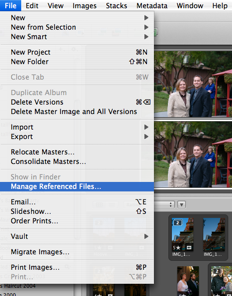
    6. Offline. When each photo is 10MB, you can’t keep every photo with you. You can, however, store the “master” on an external volume and keep a high-resolution preview and all meta-data with you at a fraction of the data size.
      picture-7.png

    If you’re using OS X and are somewhat interested in photography, I’m sorry, but you’ll probably want to bite the $279 bullet and buy Aperture, though I got my copy for about half that as a bundle deal with my camera body.
  • RAZR v3, Bluetooth, T-Mobile Internet & OS X

    Here’s the lowdown on setting up your Motorola RAZR to connect to the internet wirelessly via your bluetooth enabled Mac after signing up for T-Mobile internet services. I live in Arizona and have had no issues following these steps on several Macs.

    1. Grab this.
    2. Copy the “Motorola GPRS CID1” file into /Library/Modem Scripts
    3. Go to System Preferences -> Bluetooth -> Devices and click “Set Up New Device…”

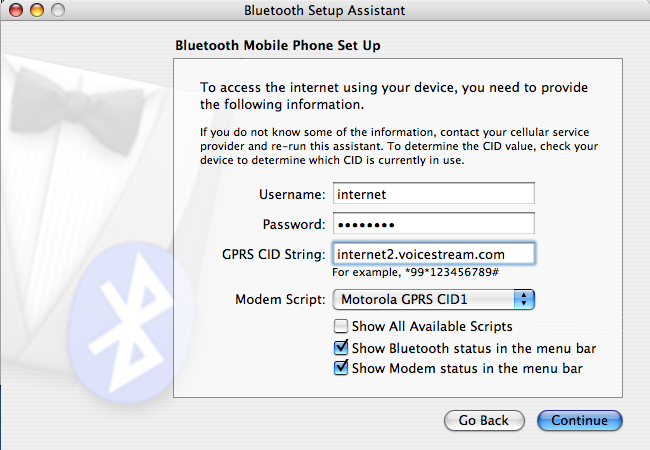
    4. After selecting the more obvious options to set up your phone, enter the connection settings as in the following screenshot. (The password is “internet”.)
      internet-setup.png

    5. After completing the wizard, select “Connect” from the new icon visible on the menu bar at the top of the screen.
      connect.png
      (Suggestion: manually “Disconnect” your phone when you’re done with the internet connection, as putting the computer to sleep while connected seems to cause issues when the system wakes up.)

  • Tips For CS/CSE/MIS Seniors

    As the Spring semester approaches, seniors start attending job fairs and submitting resumes to the Word-parsing, keyword-detecting machines of industry HR giants. In the seemingly few years since I completed my bachelors, I’ve been through the motions enough to have learned a great deal in the process. Here’s some advice for seniors trying to land sweet engineering or IT gigs.

    Schmooze

    The “it’s who you know, not what you know” principle is not bullshit. For better or worse, many things just work this way, and the tech industry is no exception. Almost every job I’ve had has been landed in part because of inside connections. Building these contacts is difficult for someone without industry experience, but can be overcome by involvement in student clubs, professional organizations, and other social activities. In my experience, involvement in mailing lists and local geek clubs has been the easiest and most beneficial means of networking. All the jobs fairs I’ve been to were a waste of time; most of the big companies just put your resume in a stack and direct you their HR website for further information.

    Infiltrate

    One of the best things you can have when approaching a company is a pre-existing positive relationship with an inside contact. The better your relationship with your contact, the more they’ll sell you up before introductions are done or resumes passed. They will build good vibes for your interview, and generate internal momentum to push the process forward from the inside. A simple, “Hey, Jim, I just wanted to give you a heads-up that there’s a really bright guy named Bob that’ll be submitting a resume today” can build a valuable pre-conception with the evaluator that gives you an advantage over other applicants, if not land you the job before the interview even starts.

    Anthropomorphize

    When submitting cover letters and conversing with potential employers, don’t send form letters. Show them you’re genuinely pumped about the job and company, and that you’re human by using real names instead of “To Whom It May Concern”. Know your audience and write to their tastes. If you know senior industry people, kindly ask them to review your writing before submission.

    Familiarize

    Do your research on a companies projects before talking to representatives, and be sure to come up with things you’ve done that could directly bring value to them. They don’t care that you have three dogs and that your cat’s name is Mittens, but they’ll find it intriguing that you’ve completed projects using Spring, Hibernate etc. If you’re talking to a non-tech person, just point out that you’re already familiar with what they’re doing and you’d love to talk to the project manager to see if you’d be a good fit. Also remember that what you what now and what you can know by your interview are two different sets of knowledge.

    Honesty & Confidence

    If you’re speaking to a technical interviewer, be honest about what you know. They’ll easily see through dodged answers and weak responses. With practice, however, you can easily turn many negatives into positives. For example, if asked “[a]re you familiar with Plajax: the AJAX for plague victims”, don’t say “No.” Instead, say “I’m familiar with Blajax: the AJAX for blind people, and have lots of experience handling server-side requests.” Always emphasise the positive. Practice in your next team meeting by using the word “and” instead of “however” and “but”. Speaking this way is an extremely valuable general-purpose skill, especially when you’re in discussions with people you don’t agree with.

  • Business Logic Code Generation

    On numerous occasions I’ve seen Java code generated by other Java code as part of a standard build process. I’m not talking about “stub” or “boiler-plate” model code produced by tools such as rmic or hibernate, respectively, but logic code produced by a script. I’ve also seen this done in other languages, but it particularly bothers me when I see it done in an object-oriented language such as Java. Almost invariably it occurs for one of two reasons: an external dependency or structure prevents sane reuse practices, or a lack of modern object-oriented analysis and design skills. (The former case simply implies the latter on someone else’s part.)

    Lame Dependencies
    Some dependencies introduce more liabilities than benefits, yet are nevertheless necessary due to business or technological constraints. Libraries and frameworks that force you to extend specific classes (as opposed to interfaces) lessen your ability to create a flexible, adaptable application on top. When large amounts of boiler-plate code are necessary to satisfy a dependency, it might be reasonable to apply code generate techniques to avoid monotony; however, the generated code should at least adapt or delegate to a separate, reusable implementation.

    Lame Developers (a.k.a. the people that write Lame Dependencies)
    The pisser scenario that is often hard to differentiate from the former is a lack of OOA&D skills on behalf of the application designer. In particular, those accustomed to procedural thought may want to introduce “procedure generation” as a sort of clever closure mechanism which is more common in languages other than Java. This translates to large amounts of redundant, unnecessary code that could likely be avoided by applying modern design patterns and generics.

    Conclusion
    Classes are more than the place you put data and methods; together they implement a higher-level design which can be expressed in higher-level terms, isolated into components, and tested and maintained as such. If you have a system composed of a mesh of interwoven procedures with many statically bound components, mutual dependencies and generated logic, it may be more procedural than object-oriented.

  • Must-Have OS X Freebies

    As far as I’m concerned, no Mac is complete without these great freebies..

    Cyberduck
    Great SFTP/FTP rich-client.

    Colloquy
    An intuitive, native IRC client

    VLC
    Dirt simple media player capable of handling things that QuickTime can’t.

    Handbrake
    All-in-one DVD ripping and encoding utility. Provides plenty of features for most of us without be overly complicated.

    Skype
    Easy-to-use VOIP client. Works with MacBook (Pro)/PowerBook microphones out-of-the-box, and provide free calls to other Skype users.

    CrossOver Mac Beta
    Every OS X user I know must operate in a Windows environment on a regular basis. The recent release of Parallels for Intel-based macs (basically VMWare workstation-style guest-OS host virtualization) has made life one tick easier by allowing us to run Windows on our Core Duo systems, and the new CrossOver Beta for Intel Macs provides a great complementary technology. CrossOver Mac, by CodeWeavers of wine fame, allows you to run some Windows applications directly on your Intel Mac, without having to host a full-fledged copy of Windows by implementing the applications APIs dependencies on the Mac. The beta is free.

    QuickSilver
    Provides Spotlight-like capabilities, but faster and way, way better. The extremely brisk find-and-launch concept will be new for many users, but will be hard to live without once understood.

  • Network De-Perimeterization: The Jericho Forum

    The presenters from the Jericho Forum at DEFCON 14 this year did an acceptable job of highlighting the principle that border firewalls are much less beneficial that they used to be for security purposes. WiFi, VPNs, MANETs etc. provide constantly changing IT environments which are not realistically plausible for IT to completely control. Our new challenge is to accept that hostile things may exist on the network, and we must solidify the security of individual services despite high-priced blue-colored networking hardware connecting it all. Their DEFCON session was unfortunately unclear on the specifics of how one accomplishes this, but I nevertheless agree with many of their core principles.

    This Decades Security Challege (good .pdf slides)
    De-perimeterization is the way to go for network security
    De-perimeterization: Jericho Forum misses the mark

  • Encryption: Use it, lest ye be thieved.

    Each time I go to DEFCON, sniff a network or see an ad for an infosec product, I’m harshly reawakened to the general publics detachment for security concerns. When using a virus scanner, firewall and pop-up blocker, most users seem comforted enough to go about daily business with a satisfactory feeling of a “secure” experience.

    A large gap with this frame of thought is of what we’re trying to secure. The most valuable thing on your computer—the stuff you want to secure if nothing else–is your personal data/information, NOT the machine itself. Most white-collar folk, in a worst-case scenario, could cough up the bones to cope with a stolen or broken machine, or re-install the OS after a bad virus attack. The data on that machine, however, may be priceless memories, confidential trade-secrets, or other information which you’d highly prefer to remain private and well backed up. As a resident of Arizona–the new U.S. capital for identity theft (per-capita)–we must recognize that the Bad Guys on the tubes do not have the primary intent to annoy us. They’re trying to make money. Compromising your system is merely a means for collecting sellable usage habits, relaying \/i@gr@ ads, stealing/selling your identity etc. We simply need to recognize that we protect system assets largely to protect our information.

    In that vein, one of the largest commonplace no-nos is sending sensitive information over ordinary email. We’ve all done it, and most will continue. Emails can pass through systems that are maintained by people you don’t know and most certainly don’t trust, so don’t be a bonehead: encrypt your email, especially if it’s sensitive material. (If your email client is a horrible bitch-goddess that makes encryption a pain to deal with, please poke the vendor with a sharp stick until they make it trivial.) Mail.app and Keychain Access.app (OS X) make it ridiculously simply to manage and use X.509 public/private keys, which you can obtain for free from Thawte. If you use Mail.app, you’re out of excuses.

    Should your machine be stolen, sold, repaired, or otherwise leave your possession, how do you know your not handing over the keys to the kingdom to a complete stranger? You can wipe the drive, but that isn’t convenient if the machine will be returned to you. A simply way is to use TrueCrypt for Windows, encrypted .dmg files for OS X, or encrypt your entire freaking home directory with FileVault. (OS X).

    OS X users have no excuse but to encrypt everything. Linux and Windows users may have difficulties, but easy wins are still possible. Encrypt your email. Encrypt your backups. Encrypt your calendar. Encrypt your address book. Encrypt your financials. Encrypt your music. Encrypt your photos. Encrypt your life.

    Encrypt everything.

  • Singletons Cause Cancer

    It’s been said before. I’ll say it again. The singleton pattern sucks. From a pragmatic point of view, it has two primary drawbacks: reuse and testability.

    Reuse

    A public static getInstance() method is, by definition, statically bound at compile time. Since you can’t override static methods, reusing singleton code via inheritance means you’ll need to create a new getInstance2() method. No matter how creative you get with this method name, you have to accept that users of your code will periodically call the parent types public getInstance() method instead of your spiffy new getInstance2(). Working off an interface largely becomes a moot point since the developer must know the exact type of singleton they want to use at compile time in order to invoke the correct getInstance() method.

    How do you configure a singleton without a parameter to getInstance(), which would not be consistent with the intentions of the pattern? Since the instance is constructed internally using a non-publically-accessible constructor, there isn’t a convenient way of introducing configuration information before it’s created.. unless the singleton is aware of a configuration source at compile time with yet more static binding. This makes the code very inflexible, as developers intending to reuse it will be at the mercy of your pre-chosen configuration mechanism, which may not be appropriate for their circumstances, or even unit testing.

    Testability

    Unit tests generally require control over the lifecycle of the class under test to fully validate proper state transition and contractual validity. Since you, the master of the known universe, are writing the software, you’ll certainly write negative scenarios into your unit tests to assert proper failure handling. If intentionally introducing a negative test results in an irrecoverable state, how do you throw out the singleton and start the next case with a new one? You can’t. What if your test case is creating a tricky concurrency scenario emulating multiple systems within the sandbox of a single JVM? You can’t (trivially). What happens when you discover you need multiple instances of the singleton within your application? You can’t. Time to refactor.

    Additionally, unit testing of code using static singleton dependencies has a high potential of awkwardness due to an inability to swap out implementations for mock objects. Under the principle of designing for testability, quality and maintainability, hackishness is not a quality to aspire to.

    Conclusion

    Singletons can be hazardous to your health, seriously jeopardize your family’s safety, and have been classified as ‘terrorist patterns’ by the U.S. government. The fact that an application only needs one instance of something does not mean the object should be designed that way, and there aren’t very many scenarios where singletons are appropriate. Do as the Jedi do and use them with consideration and responsibly.

  • Back From Baja

    We’ve just returned from our getaway to Baja and California. Brief, self-explanitory electrocolorogram highlights here.

  • On Brooks

    I’ve written this same basic argument for small teams three or four times now, so to comply with the Don’t Repeat Yourself (DRY) principle I though I’d post it. In short, this argument repeats Brooks’ Mythical Man-Month concept 🙂 , and asserts that you must restructure the communications dynamics of a team when it changes in size, regardless of whether or not your project is late.

    To paraphrase one of the points made in Frederick Brooks’ The Mythical Man Month, complexity in a system scales with the number of interfaces. Applied to a team communications system of N people, the worst-case number of total communications channels is when everybody talks to everybody else. This can be expressed by N(N-1)/2. In other words, a given person in the team (the Nth person) is communicating with everyone else (N-1 people). So the problem with large horizontal teams is that as N increases, the communications overhead of being able to operate has the potential to increase exponentially.

    As a member of a 5 person team, keeping open, frequent communication with 4 others is no big deal. Even with 5(5-1)/2 = 10 different relationship combinations, all 5 people can keep current with the other 4.

    If this team grows to 15 people, however, communicating is not as simple. In the worst case, not only do you have to communicate with 14 other peers, there are now 15(15-1)/2 = 105 total relationships between people, each with their own dynamics and influences. The team is only 3x bigger, but now has 10.5x the number of interpersonal relationships. And the majority of the information going across those channels may be irrelevant to your job, but if it’s relevant to the team as a whole, you’ll be sucked into meetings and email threads spending time and mental cycles just on overhead of keeping the collective ship floating in the right direction.

    Now, this is all worst-case abstract theory, but does highlight the scaling problems of communication in teams of fluctuating size. As your team scales, you need to reevaluate communication culture to keep operating overhead low and excessive communication to a minimum.