OpenRain used a slew of crappy Trac sites for issue tracking until we switched to Redmine several days ago. The decision came because..
- Redmine can authenticate off LDAP with trivial configuration.
- Redmine has multi-project support out-of-the-box.
- Redmine has some nifty Gantt chart and calendaring schwag and is generally better.
- Parallels Server (for OS X) is finally available.
- JumpBox has a beta Redmine VM image available.
If you’ve got an existing LDAP infrastructure, the whole shebang shouldn’t take more than an hour or two to set up.
- Install Parallels Server on your OS X Leopard server.
- Download the Redmine JumpBox. Generate a new MAC address and boot it. Do the one-page configuration thingy in your browser.
- Log into Redmine and create a new “Authentication Mode” set to LDAP. If you’re using the default OpenLDAP schema that ships with Leopard server, enter the attributes like so..
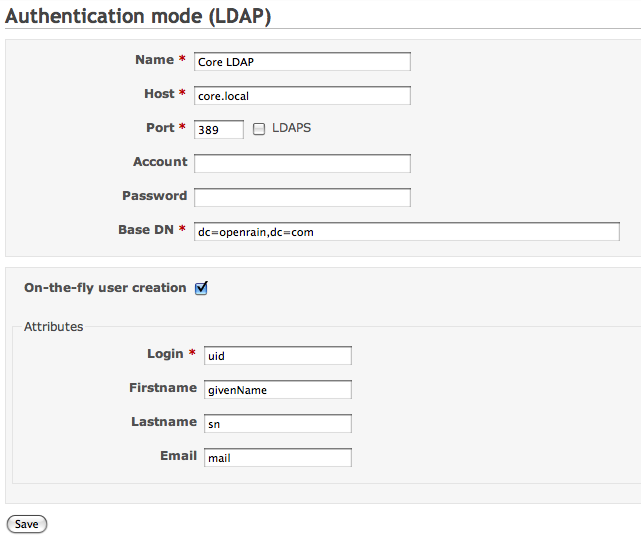
- All your users should now be able to log into your Redmine JumpBox using their LDAP credentials! You’ll have to set up your projects, ACLs etc. within Redmine, but that’s some pretty hot shizzle to get running in such a small timeframe.
Mad props to Redmine, Parallels, JumpBox and Apple for further simplifying my business.


Leave a Reply