I tried Parallels Desktop‘s Coherence mode today, and was so blown away I had to blog about it immediately.
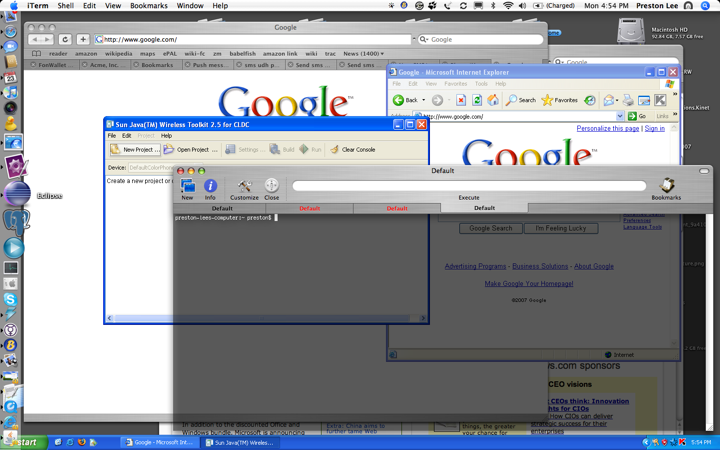
The above image has not been doctored. It’s my normal OS X desktop with Windows XP running in coherence mode. When activated, the window around the XP virtualization session vanishes, the XP taskbar integrates into your OS X desktop, and XP application windows are free to float around. With Parallels Tools installed each XP application has a dock item which can be Command-Tabbed to. If you look closely you can see I’m running IE 6 next to Safari, both natively, without the visual distraction of the virtualization window. This is a huge usability landmark. Thank you Parallels!
Try it yourself by selecting the View -> Coherence menu option when running Parallels Desktop.
(Question: Does VMWare currently have a feature like this?)

Leave a Reply