Month: May 2008

  • Leopard Server: Bonjour-Based DNS A Performance No-No

    Prior to moving into the new OpenRain office (announcement coming in June), we used OS X’s magical .local addressing to find all our servers. This allowed us to keep almost everything on DHCP, which is trivial to set up and administer. Little did we know, however, that this was being the root cause of many internal issues.

    • General network I/O performance (file server access, OpenLDAP-based logins etc.) sucked. Simply using Server Admin or Workgroup Manager across the network would often take 5+ seconds to log in.
    • Portable Home Directory (PHD) syncing, VPN and firewall services never seemed to work right, possibly due to nonequivalences between “server.example.com” and “server.local” in SSL and SSH. I’m not completely sure, but stuff broke in more ways than one.

    Case in point: do not use bonjour-based DNS for your core network services. Use a proper DNS server from the start. DNS is a cornerstone dependency of all the other services provided by your Leopard server, so any performance issues you introduce at this level will carry through to your entire infrastructure.


  • Five Major Apple Design Irritants

    Apple,

    My software development firm–OpenRain in Arizona–spends buckets of money on your products. Stuff works pretty well in general, but you really need to address these issues. Really.

    1. PowerBook, MacBook and MacBook Pro power supply cables invariably rip. Not only that, but it’s always at the same freaking places. The MackBook/Pro power supplies are better than the PowerBook ones, but still don’t last more than a couple years of real-world use. The issue is at the endpoints of the laptop end of the cable that get bent constantly from travel and being wrapped sharply when the electric outlet is on the wrong side of the laptop. I really love the small and agile design, but the cables need to last at least 4 years without tearing.
    2. Laptops still run hot. Phoenix summer get hotter than 110 degrees Fahrenheit, and I have gotten physically burned by the MacBook Pros when wearing shorts. Product such as the iLap are amusing, but should not be necessary. Getting physically hurt by a computer is a problem.
    3. Keyboard are not ergonomic. The latest iteration of post-modern laptop-style bluetooth keyboards are great to look at, but absolutely horrid on the wrists. No one at the office really likes them in practice, and we’ve had to revert to the Microsoft Natural series of keyboards when have been around f-o-r-e-v-a-r but Apple hasn’t responded to. I’m 100% confident you could build a swanky, highly usable bluetooth keyboard that puts the Naturals to shame.
    4. iPhone copy/paste support. It’ll be an awesome design accomplishment when we no longer need this, but you haven’t gotten there yet, sorry, and everyone else agrees. Add copy/paste support (if only in key areas) to iPhone.
    5. iPhone needs to support dvorak. Yeah yeah…. I know I’m in the minority on this and am sneaking it in, but I spend a lot of money with you guys, and having to use QWERTY just for the iPhone is driving me insane. Add the freaking layout please.


  • Pictures: Cape Cod

    I was over in the Boston/Cape Cod area earlier this month. Only got to site see for a couple hours but still thought I’d share the few shots I have. What I learned while visiting..
    • My grandma once used Jackie O’s toilet.
    • I’m about 2 megadollars short of being able to live there.
    • Every photo you take would be perfect for a viagra ad.
  • Pictures: Costa Rican Landscapes

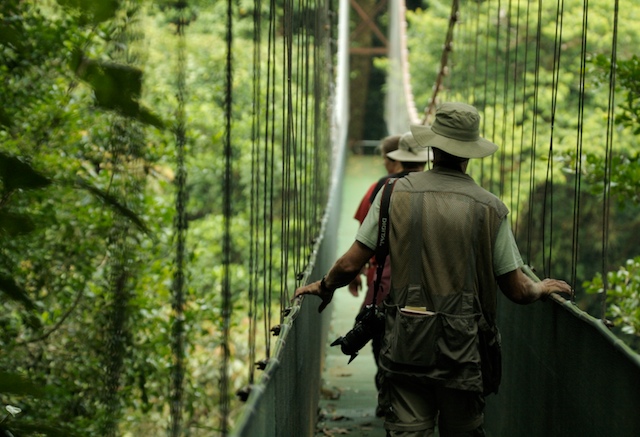
    I recently returned from a week-long trip from Costa Rica. These are best frames from the trip and are intended for large format viewing. Flickr royally sucks at that (everything is shown low-res by default), but you can nab higher-def shots with a few clicks if you have a 24″+ monitor and would like to fill your screen.

    Contact me privately if you’d like copies of the highest resolution RAW sources. (JPEG == Yucky.)

    Costa Rica 2008 Flickr Set


  • Book Review: Digital Astrophotography, by Stefan Seip

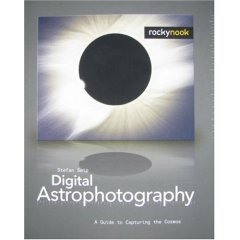
    Rocky Nook — a digital photography book publisher in California — sent me a review copy of Digital Astrophotography: A Guide to Capturing the Cosmos for review, which I read over the last few months.

    Pros


    • A good overview of the techniques used in astrophotography.
    • Well illustrated.
    • Inexpensive.
    • Largely easy to follow for the casual reader.
    • Covers the entire process, from equipment to post-processing. I’m very well oriented with “typical” production and post-production photography methods, but was unaware of the additional complexities and tools involved with astrophotography.  


    Cons


    • Casual SLR/DSLR and point-and-shoot users will not be able to suddenly get stunning frames of the night sky. It turns out that the equipment required to get decent shots requires a level of financial commitment to the niche you aren’t likely to make unless you have a professional need or really, really, REALLY like looking at celestial bodies. You’ll probably need a special mount for your camera, or build a jig yourself. I did not want to invest a significant amount of money, so I have been unable to try many of the techniques described.
    • If you’re bad at math, you may find some of the technical setup difficult to follow.  
    • The tools covered are Windows applications. Bah. 


    Recommendation

    Buy if..


    1. You’re serious about becoming astrophotography and have the cash to pony up for specialty hardware, or
    2. You are not planning on trying it for yourself but nevertheless have $20 of curiousity.


  • New MacBook Pro Battery

    The stock battery on my 1st-generation MacBook Pro has only been providing an hour of power as of late. When I hot-swapped in a fully charged new battery from my local Apple store, I was thrilled with the estimated remaining charge..

    I highly doubt it will actually last this long, but one can dream. 🙂

  • Dear TSA, Check Out The 4th Amendment. Thanks.

    Just a little food for thought for your next airplane ride. The 4th amendment of the U.S. constitution reads..

    The right of the people to be secure in their persons, houses, papers, and effects, against unreasonable searches and seizures, shall not be violated, and no warrants shall issue, but upon probable cause, supported by oath or affirmation, and particularly describing the place to be searched, and the persons or things to be seized.

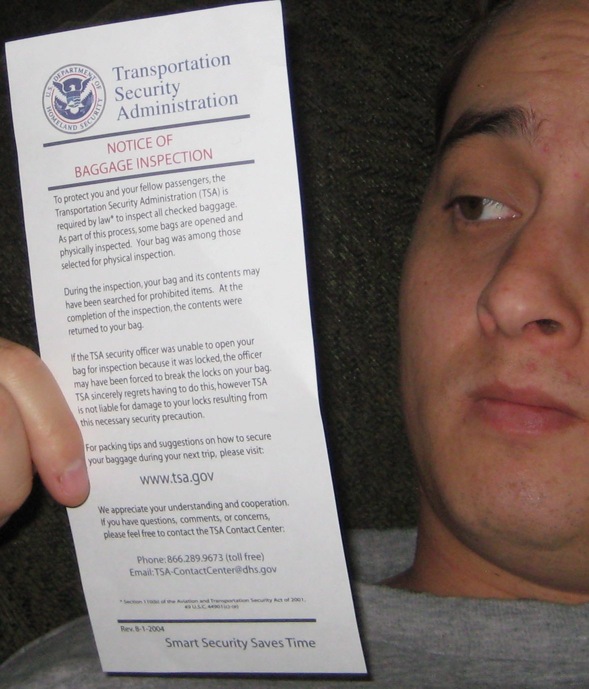
    Sounds reasonable to me. And now, the little note from the TSA left in my checked bag, neatly tucked between my clean, folded boxer shorts..

    The full text follows below the line..


    Transportation
    Security
    Administration


    NOTICE OF
    BAGGAGE INSPECTION 


    To protect you and your fellow passengers, the Transportation Security Administration (TSA) is required by law* to inspect all checked baggage. As part of the process, some bags are opened and physically inspected. Your bag was among those selected for physical inspection.

    During the inspection, your bag and its contents may have been searched for prohibited items. At the completion of the inspection, the contents were returned to your bag.

    If the TSA security officer was unable to open your bag for inspection because it was locked, the officer may have been forced to break the locks on your bag. TSA sincerely regrets having to do this, however TSA is not liable for damage to your locks resulting from this necessary security precaution.

    For packing tips and suggestions on how to secure your baggage during your next trip, please visit:

    We appreciate your understanding and cooperation. If you have questions, comments, or concerns, please feel free to contact the TSA Contact Center:

    Phone:866.289.9673 (toll free)
    Email:TSA-ContactCenter@dhs.gov
    *Section 110(b) of the Aviation and Transportation Security Act of 2001,
    49 U.S.C. 44901(c)-(e)
    Rev. 8-1-2004
    Smart Security Saves Time