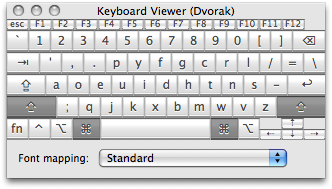
 It’s been exactly one week since I switched to the Dvorak Simplified Keyboard (DSK) layout. Thoughts…
- The first couple days are especially frustrating while you memorize key locations and build a small bit of muscle memory for common phrases. Hang in there.. this is the toughest part.
- Temporarily relabel your real keyboard with cheap stickers from eBay or physically rearrange the keys on a cheapo USB keyboard while you’re learning. Physically mod’ing a QWERTY board kinda sucks, though, because..
- The nubs for the pointer finger keys are in the wrong place. This alone is a deal breaker.
- Keys aren’t necessarily manufactured to be of homogeneous shape. Even on my cheapo Memorex, for example, the key tops are sloped differently by row, so rearranging the keys results in what feels like a 3D topology of the Rocky Mountains.
- The common typos (“teh”, “taht”, “nad” etc.) are different, so..
- You’ll have to be more accurate in IM conversations. People won’t be able to guess what you meant to type.
- Spell-checkers won’t work as well.
- Make every reasonable attempt to avoid using QWERTY while you’re learning.
- Be prepared to explain to people WTF you just did to their computer when you use it.. Every. Freakin’. Time.
- Looking for an ergonomic, Dvorak Mac keyboard? LOLL3RSKATES!!! Good luck with that, and let me know if you think your new $300+ Kinesis is worth it.